Genesys Pulse

2018

Genesys Pulse — From Legacy to Web-First Dashboard
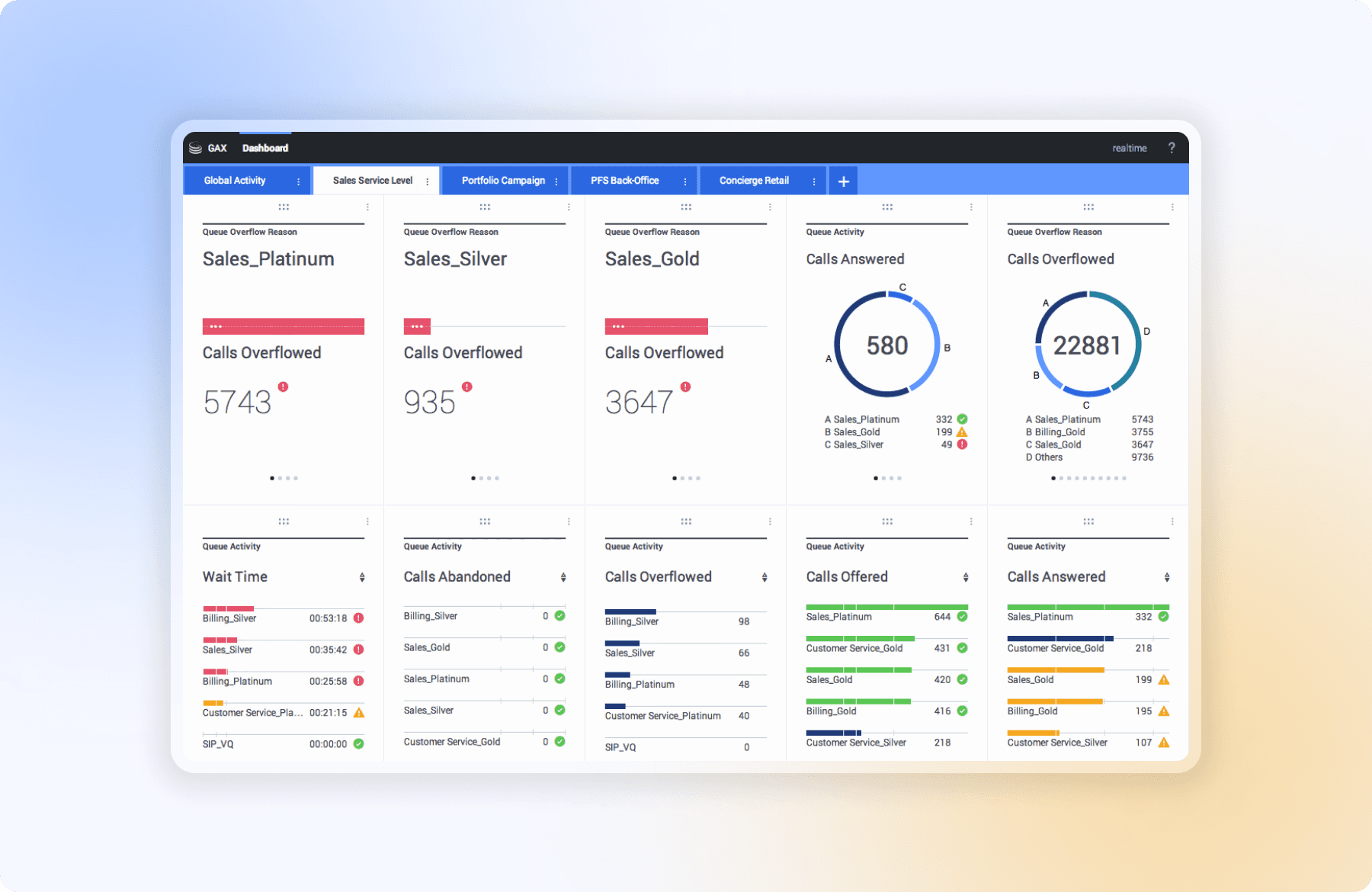
Genesys Pulse is the web-based, widget-driven replacement for CCPulse+ — Genesys's legacy thick-client desktop reporting tool. CCPulse+ reached End of Component Support on January 31, 2020. Genesys officially recommended migration to Pulse for all customers. I was the designer responsible for shaping what that replacement would actually be — and for making it good enough that enterprise customers would choose to migrate, not resist it.

Genesys Pulse is the web-based, widget-driven replacement for CCPulse+ — Genesys's legacy thick-client desktop reporting tool. CCPulse+ reached End of Component Support on January 31, 2020. Genesys officially recommended migration to Pulse for all customers. I was the designer responsible for shaping what that replacement would actually be — and for making it good enough that enterprise customers would choose to migrate, not resist it.

This wasn't a speculative redesign exercise. It was the product. I owned the full design process — from research synthesis through wireframing, interaction design, and hi-fidelity delivery — working closely with the PM on scope and engineering on constraints. Six months across discovery, design, and two phased releases.

This wasn't a speculative redesign exercise. It was the product. I owned the full design process — from research synthesis through wireframing, interaction design, and hi-fidelity delivery — working closely with the PM on scope and engineering on constraints. Six months across discovery, design, and two phased releases.

Role

Lead Product Designer

Research → Handoff

Team

1x Product Manager

3x Engineers

1x QA

Impact

63% less time to rebuild dashboards

71% faster SLA breach detection

78% wallboard adoption in 60 days

Role

Lead Product Designer

Research → Handoff

Team

1x Product Manager

3x Engineers

1x QA

Impact

63% less time to rebuild dashboards

71% faster SLA breach detection

78% wallboard adoption in 60 days

Role

Lead Product Designer

Research → Handoff

Team

1x Product Manager

3x Engineers

1x QA / Compliance

Impact

63% less time to rebuild dashboards

71% faster SLA breach detection

78% wallboard adoption in 60 days

Project context

Two very different products — and why that matters

Understanding what I was replacing was as important as knowing what I was building. CCPulse+ and Genesys Pulse aren't just different versions of the same tool — they're different architectures, different paradigms, and different relationships with the people who use them.

CCPulse+ (Legacy)

A "thick client" Windows desktop application requiring installation on every individual machine. Table-grid layout, floating windows, passive data display. Configured at the system level — changes required IT involvement.

CCPulse+ (Legacy)

A "thick client" Windows desktop application requiring installation on every individual machine. Table-grid layout, floating windows, passive data display. Configured at the system level — changes required IT involvement.

Genesys Pulse (New)

A web-based, widget-driven application. Browser-accessible, no installation required. Modular dashboards, real-time threshold alerting, built-in wallboard mode. Genesys's official next-generation replacement — the product I was designing from the ground up.

The Migration Problem

Custom reports built in CCPulse+ couldn't be imported — they had to be rebuilt for Pulse. Enterprise customers had trained their supervisors on CCPulse+ workflows. A replacement product that wasn't meaningfully better would be resisted, not adopted.

The Migration Problem

The majority of Amex cardholders book flights directly with airlines or through third-party sites. The portal restriction locked out most of the eligible audience before they even started.

Genesys officially sunset CCPulse+ and recommended all customers migrate to Genesys Pulse. This wasn't optional for enterprise customers — it was a platform-level migration. The design had to be compelling enough that supervisors who'd spent years in CCPulse+ would actually want to move, not just be forced to.

The stakes this created for design were specific: every CCPulse+ workflow that Pulse couldn't match was a reason for a customer to delay migration or push back on their Genesys contract. Every improvement over CCPulse+ was a reason to move faster. My job was to understand what supervisors actually needed — not just replicate what CCPulse+ already did.

Research

Understanding two problems at once: the old tool and the people who used it

Research for a migration product has a dual focus that a greenfield product doesn't: you need to understand what's broken about the existing tool, and you need to understand what muscle memory and mental models people have built around it — because you can't ignore either.

I ran shadow sessions with 11 contact center supervisors across three enterprise clients — watching them work through real shifts in CCPulse+, not staged demos. I audited four competing web tools (NICE CXone, Verint, Avaya Oceana, Cisco CUIC), analyzed six months of support tickets tagged to both CCPulse+ and early Pulse releases, and synthesized findings from a prior customer satisfaction study the product team had commissioned.

Brainstorming session with internal team
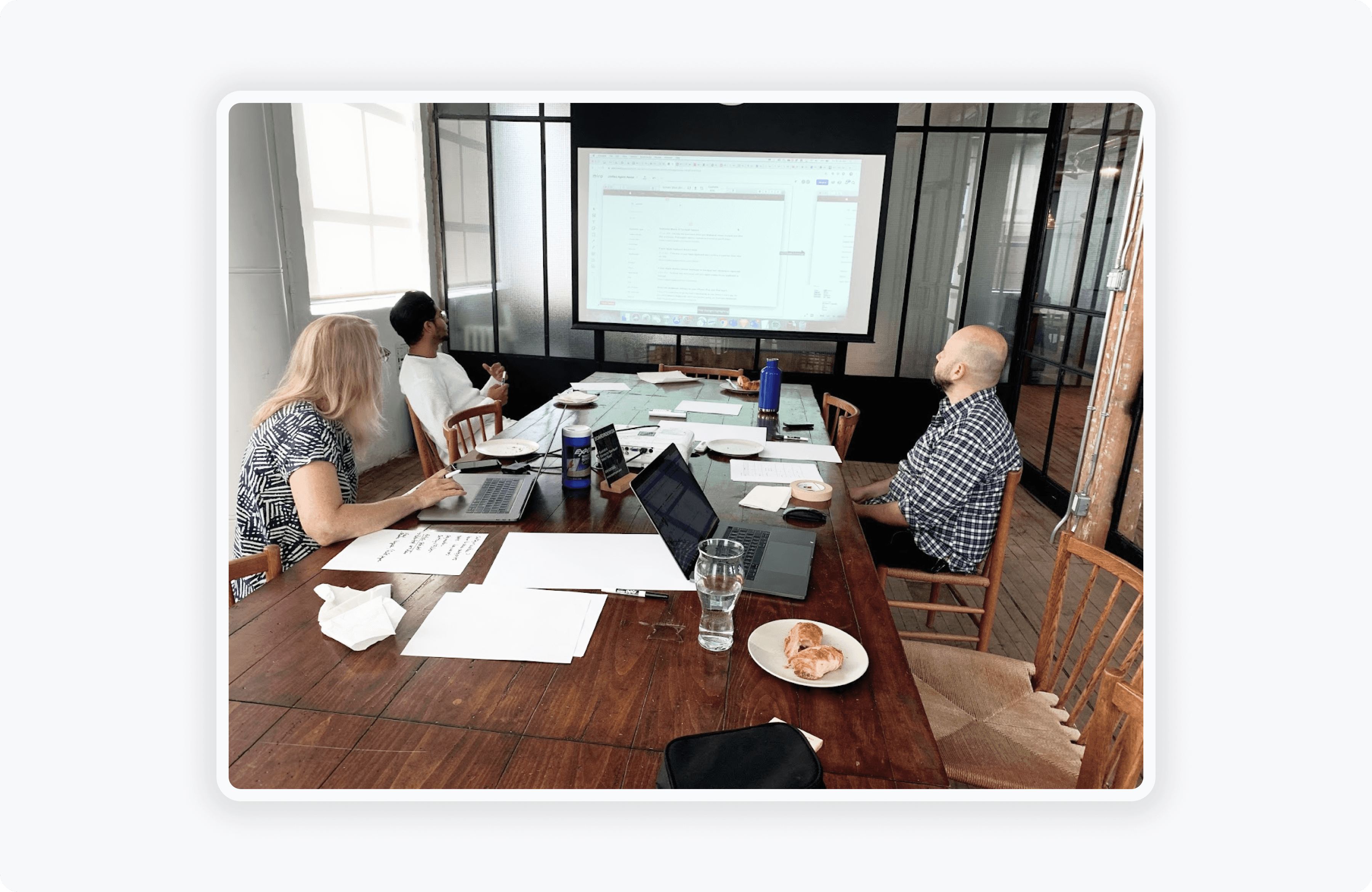
Finding 1 Supervisors had built entire parallel systems around CCPulse+'s limitations

Every supervisor I shadowed ran CCPulse+ alongside a separate voice platform, an email queue tool, and a manual notes spreadsheet. The product didn't cover enough — so they filled the gaps with workarounds. These weren't just inefficiencies; they were entrenched habits. Pulse had to earn each of those tabs back.

Finding 1 Supervisors had built entire parallel systems around CCPulse+'s limitations

Every supervisor I shadowed ran CCPulse+ alongside a separate voice platform, an email queue tool, and a manual notes spreadsheet. The product didn't cover enough — so they filled the gaps with workarounds. These weren't just inefficiencies; they were entrenched habits. Pulse had to earn each of those tabs back.

Finding 2 The passive data model meant supervisors were always one missed glance away from a breach

CCPulse+'s threshold alerting was a red cell in a table row. Nothing else changed. In 7 of 11 sessions, I watched supervisors miss live SLA breaches for more than six minutes — not because they weren't paying attention, but because the tool required continuous active scanning to catch anything. The architecture of attention was wrong.

Finding 2 The passive data model meant supervisors were always one missed glance away from a breach

CCPulse+'s threshold alerting was a red cell in a table row. Nothing else changed. In 7 of 11 sessions, I watched supervisors miss live SLA breaches for more than six minutes — not because they weren't paying attention, but because the tool required continuous active scanning to catch anything. The architecture of attention was wrong.

Finding 3 The "wallboard" in CCPulse+ wasn't a product feature — it was a PowerPoint workaround

Several client sites had TVs on the contact center floor. The actual workflow: screenshot CCPulse+, paste into PowerPoint, email to a colleague, upload to a media player. Refreshed once a shift. Supervisors had normalized this because CCPulse+ offered nothing better. It wasn't a gap — it was an opportunity Pulse could own completely.

Finding 3 The "wallboard" in CCPulse+ wasn't a product feature — it was a PowerPoint workaround

Several client sites had TVs on the contact center floor. The actual workflow: screenshot CCPulse+, paste into PowerPoint, email to a colleague, upload to a media player. Refreshed once a shift. Supervisors had normalized this because CCPulse+ offered nothing better. It wasn't a gap — it was an opportunity Pulse could own completely.

"We've been asking for a proper web version for years. But if it can't do what CCPulse+ does, my team won't use it — and I can't make them."

Problem area

What supervisors were actually working with every day

This is CCPulse+. The product I was replacing. Every structural problem Pulse needed to solve is visible in this single screenshot — which is exactly why I used it as the anchor for every design decision I made.

CCPulse+ — Agent States view (thick-client Windows app)
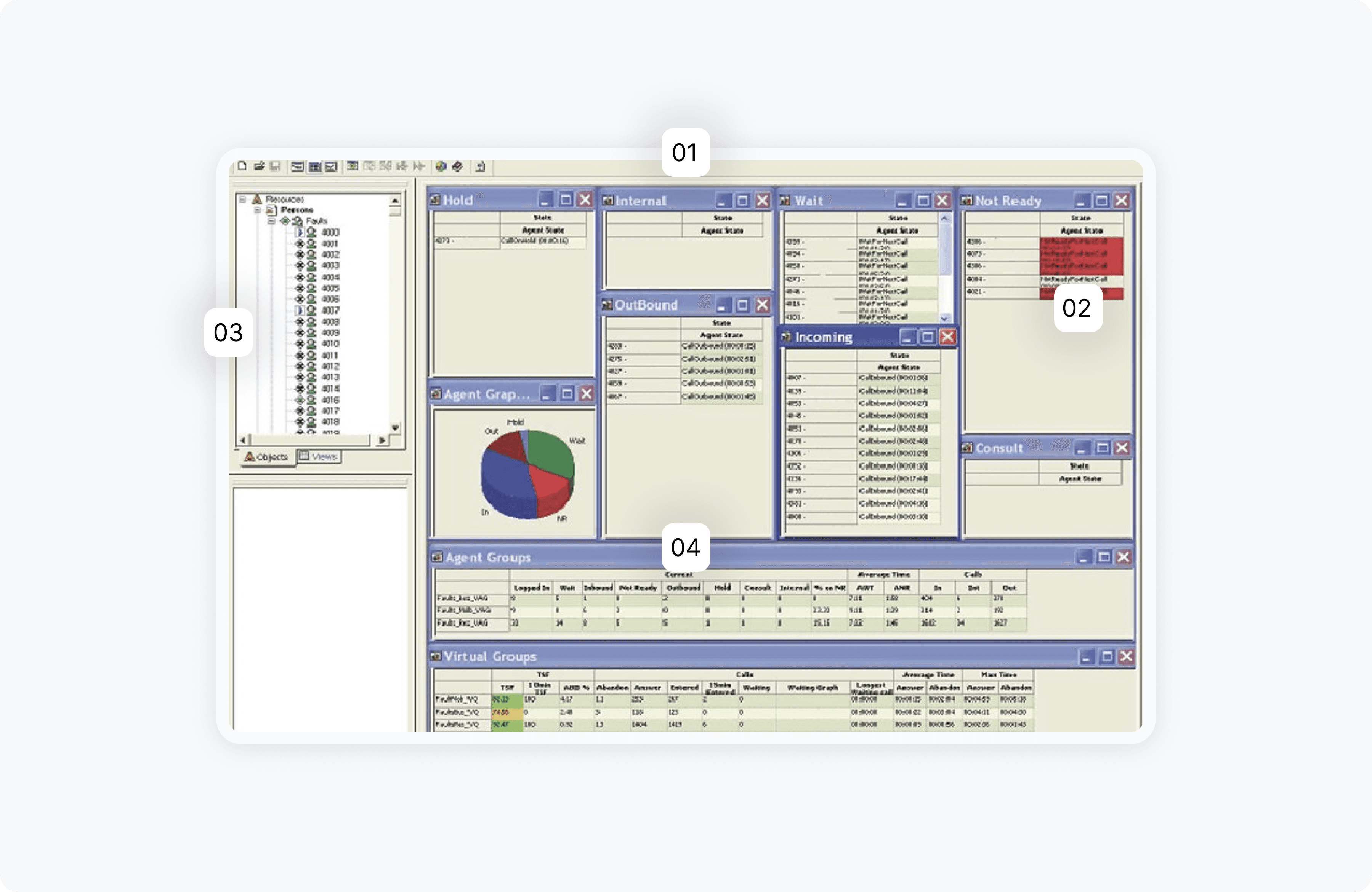
Separate floating windows — Hold, Internal, Wait, Not Ready, Outbound, Incoming, Consult, Agent Graph — each independently sized and positioned.

Separate floating windows — Hold, Internal, Wait, Not Ready, Outbound, Incoming, Consult, Agent Graph — each independently sized and positioned.

Threshold breaches surfaced only as red cells in table rows, with no widget-level state change. Supervisors had to actively scan every panel simultaneously to catch a problem. The architecture demanded constant attention to give any alert at all.

Threshold breaches surfaced only as red cells in table rows, with no widget-level state change. Supervisors had to actively scan every panel simultaneously to catch a problem. The architecture demanded constant attention to give any alert at all.

A fixed object tree on the left requiring an IT ticket and backend data model knowledge to change.

Every panel carried full Windows minimize/maximize/close chrome, consuming screen real estate on a surface already fighting for space.

Design goals

What Pulse needed to be to make migration worth it

Migration only succeeds if the new product is meaningfully better — not just different. These three goals were the design brief: solve the problems CCPulse+ couldn't solve, and be compelling enough that supervisors who'd spent years in the old tool would want to move.

Replace floating panels with one composable, self-service dashboard

A supervisor should be able to configure a view that matches their actual span of control — without raising an IT ticket, without knowing the backend data model, in under five minutes. Migration shouldn't mean starting over; it should mean gaining control.

Replace floating panels with one composable, self-service dashboard

A supervisor should be able to configure a view that matches their actual span of control — without raising an IT ticket, without knowing the backend data model, in under five minutes. Migration shouldn't mean starting over; it should mean gaining control.

Replace passive red rows with ambient, widget-level alerting

A supervisor shouldn't have to stare at eight panels simultaneously to catch a breach. When a KPI crosses a threshold, the entire widget should change state — visibly, immediately, at a glance. The tool should work for supervisors, not require supervisors to work for it.

Replace passive red rows with ambient, widget-level alerting

A supervisor shouldn't have to stare at eight panels simultaneously to catch a breach. When a KPI crosses a threshold, the entire widget should change state — visibly, immediately, at a glance. The tool should work for supervisors, not require supervisors to work for it.

Build a real wallboard — a first-class feature, not a PowerPoint workaround

Purpose-built for floor display: readable at 15 feet, zero editing chrome, auto-cycling. A distinct surface with its own layout rules. The thing supervisors have been asking for since CCPulse+ launched and never got.

Build a real wallboard — a first-class feature, not a PowerPoint workaround

Purpose-built for floor display: readable at 15 feet, zero editing chrome, auto-cycling. A distinct surface with its own layout rules. The thing supervisors have been asking for since CCPulse+ launched and never got.

Design decision 1

A modular widget system — replacing floating panels with one composable surface

The answer to CCPulse+'s floating-window architecture wasn't fewer panels — it was a completely different mental model. I moved from a floating-window paradigm to a composable widget system. Supervisors add, remove, resize, and rearrange widgets to match their actual span of control. Each widget renders one of five chart types: KPI counter, Donut, Data table, Time tracking or List.

To address the migration concern directly — rebuilding CCPulse+ custom reports from scratch — I designed a widget catalog with a "starter pack" template seeded with the most common supervisor configurations. The goal was to make rebuilding faster than maintaining the old CCPulse+ setup. Dashboards can be saved, cloned, published to a team, or exported as JSON.

One composable dashboard replacing CCPulse+ floating panels
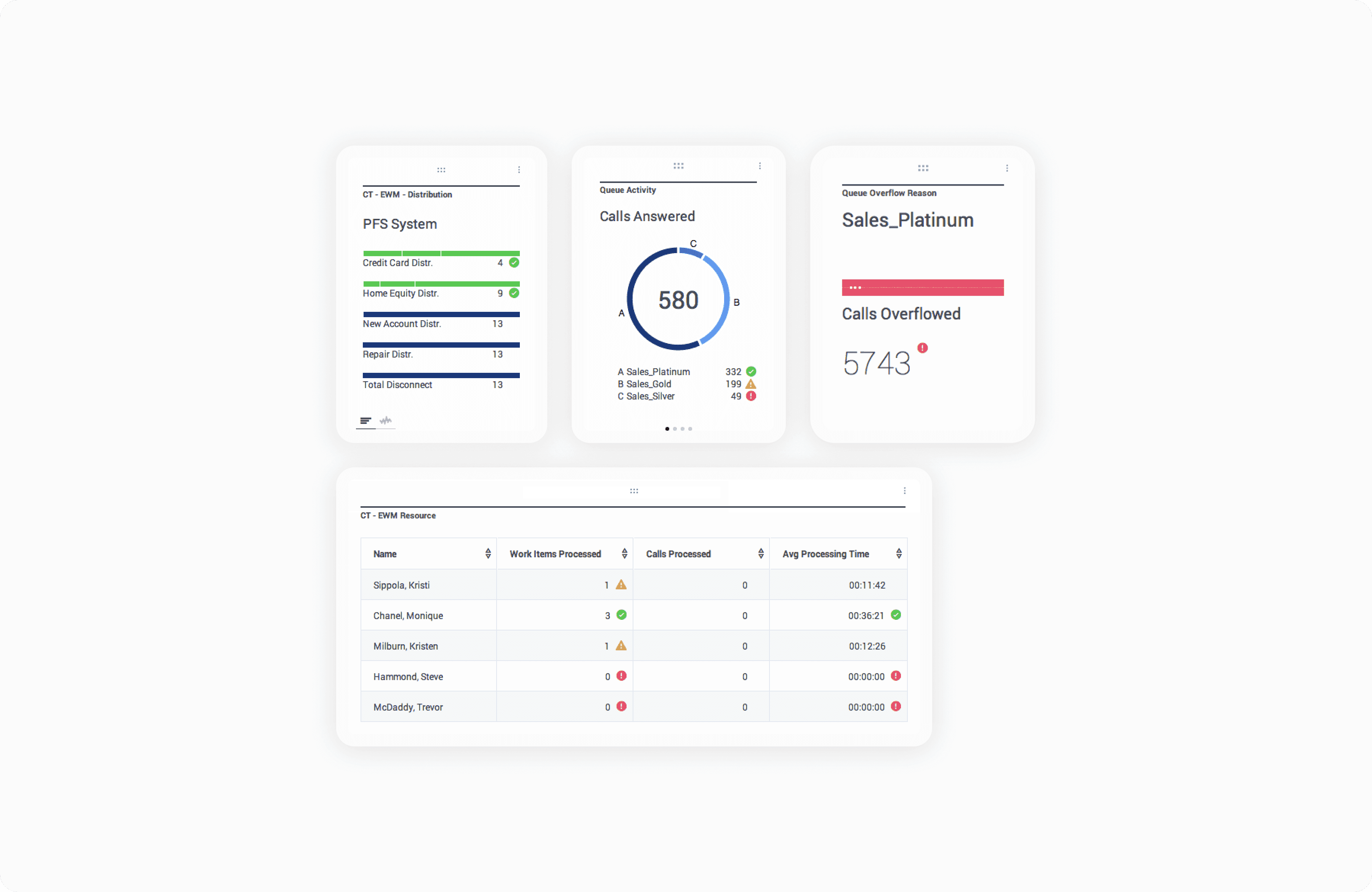
Design exploration — directions considered before the widget system

Fixed template library

A set of pre-built, locked dashboard layouts — Sales, Operations, Back-Office. Faster onboarding but no self-service. Supervisors with non-standard spans of control were no better off than in CCPulse+. Rejected: solved the blank canvas problem without solving the customization problem.

Fixed template library

A set of pre-built, locked dashboard layouts — Sales, Operations, Back-Office. Faster onboarding but no self-service. Supervisors with non-standard spans of control were no better off than in CCPulse+. Rejected: solved the blank canvas problem without solving the customization problem.

Role-based auto-layout

Automatically generate a dashboard based on the user's assigned role in Genesys config. Elegant in theory — but the role model in enterprise CCPulse+ deployments was inconsistent and often misconfigured. Rejected: too dependent on client data hygiene we couldn't guarantee.

Role-based auto-layout

Automatically generate a dashboard based on the user's assigned role in Genesys config. Elegant in theory — but the role model in enterprise CCPulse+ deployments was inconsistent and often misconfigured. Rejected: too dependent on client data hygiene we couldn't guarantee.

Modular widget system + starter pack

Full composability with a curated default template. Supervisors start with something useful and adjust from there. The starter pack is explicitly seeded with the most common CCPulse+ configurations — so migrating users recognize it immediately.

Modular widget system + starter pack

Full composability with a curated default template. Supervisors start with something useful and adjust from there. The starter pack is explicitly seeded with the most common CCPulse+ configurations — so migrating users recognize it immediately.

Design decision 2

A real wallboard — built for the wall, not ported from the dashboard

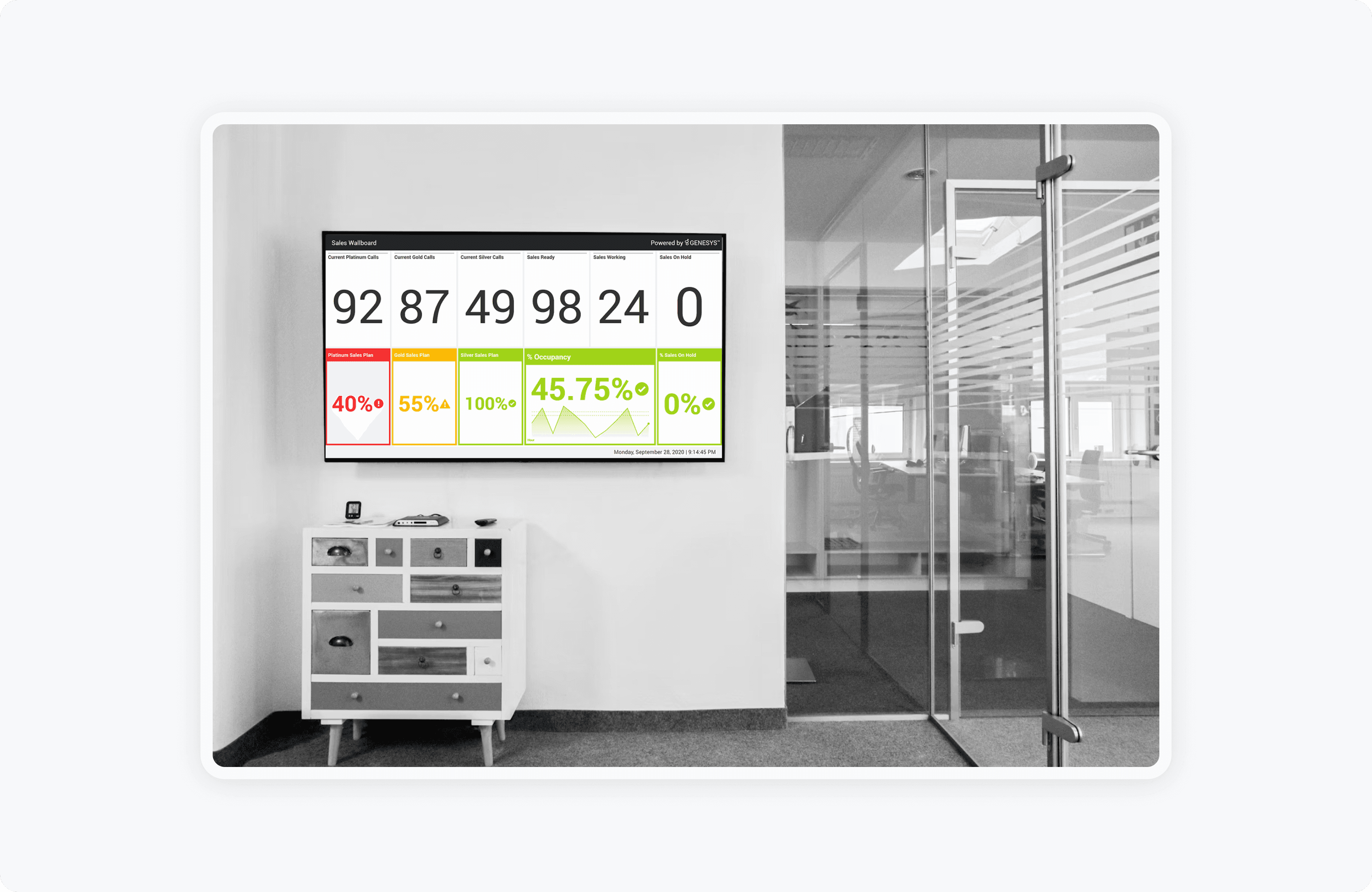
The CCPulse+ wallboard was a PowerPoint screenshot refreshed once a shift. This wasn't a quirk of the tool — it was a fundamental limitation of a thick-client desktop application that had no concept of a display-only surface. Pulse had a chance to solve this properly.

I designed Wallboard Mode as a distinct layout system — a separate set of rules that activates when a supervisor clicks "Launch Wallboard." KPI values render at 52px minimum, widget density reduces to what's readable at 15 feet, the display cycles automatically on a configurable timer, and all editing chrome disappears entirely. Agents read data; they don't need a "More" menu. The three-state threshold system carries over directly — a red widget is as unmissable on a 15-foot TV as at a laptop screen.

Genesys Pulse — Wallboard · Global Operations
Constraints navigated

The friction that shaped every decision

Designing a migration replacement for an enterprise product has constraints a greenfield project doesn't. Beyond the usual technical and organizational friction, I had to account for what CCPulse+ had trained people to expect — and where that expectation was worth keeping versus where it needed to break.

Retrospective

Did migration actually happen — and what did the numbers say

A migration product's success isn't just measured by product metrics. It's measured by whether customers moved. Numbers from session replay analysis, support ticket tracking, in-app telemetry, and the post-launch NPS survey run three months after release.

Before and After redesign

Impact

71% Faster time-to-alert identification

Mean time from SLA breach to supervisor acknowledgment dropped from 8.2 to 2.4 minutes — measured via session replay timestamps correlated with threshold event logs. The ambient three-state widget system directly addressed the core CCPulse+ failure of passive red rows.

71% Faster time-to-alert identification

Mean time from SLA breach to supervisor acknowledgment dropped from 8.2 to 2.4 minutes — measured via session replay timestamps correlated with threshold event logs. The ambient three-state widget system directly addressed the core CCPulse+ failure of passive red rows.

63% Reduction in dashboard setup time

Average time to configure a working personal dashboard dropped from ~45 minutes (requiring IT in CCPulse+) to ~17 minutes (fully self-service in Pulse). Measured via in-product telemetry in the first 30 days post-launch. Directly addressed the migration reconstruction cost concern.

78% Wallboard adoption in 60 days

78% of enterprise customers launched at least one live wallboard within 60 days. Before the redesign, effectively zero were using a live wallboard feature — reverting instead to the manual CCPulse+ PowerPoint screenshot workflow. This was the clearest signal that migration was delivering on its promise.

Impact

71% Faster time-to-alert identification

Mean time from SLA breach to supervisor acknowledgment dropped from 8.2 to 2.4 minutes — measured via session replay timestamps correlated with threshold event logs. The ambient three-state widget system directly addressed the core CCPulse+ failure of passive red rows.

63% Reduction in dashboard setup time

Average time to configure a working personal dashboard dropped from ~45 minutes (requiring IT in CCPulse+) to ~17 minutes (fully self-service in Pulse). Measured via in-product telemetry in the first 30 days post-launch. Directly addressed the migration reconstruction cost concern.

78% Wallboard adoption in 60 days

78% of enterprise customers launched at least one live wallboard within 60 days. Before the redesign, effectively zero were using a live wallboard feature — reverting instead to the manual CCPulse+ PowerPoint screenshot workflow. This was the clearest signal that migration was delivering on its promise.

Create a free website with Framer, the website builder loved by startups, designers and agencies.